
To scan bills of lading or air waybills with AI, photograph or upload each document in a capture app, let the app check it and read its fields, review what it extracted, then save, email or send the data on to your TMS. With DataGun, all of that happens in the iOS or Android app, or in the web app at app.thedatagun.ai.
Under the hood this is bill of lading OCR and air waybill OCR with one more step: instead of returning a block of text, the AI maps what it reads to named fields (BOL number, shipper, consignee, weight, signatures) and checks the document before it is accepted. That is the difference between capture at the dock and scanning in the back office.
| Where it runs | iOS, Android and the web app |
| Documents | Bills of lading (BOLs) and air waybills (AWBs); other freight documents such as invoices and PODs are captured and labeled “Other” |
| Output | More than 50 fields per document |
| Checks | Image quality, required fields, and signature and date |
Built by WeBuild Databases, founded 2006 · iOS, Android and web.
Step 1: Capture or upload the document
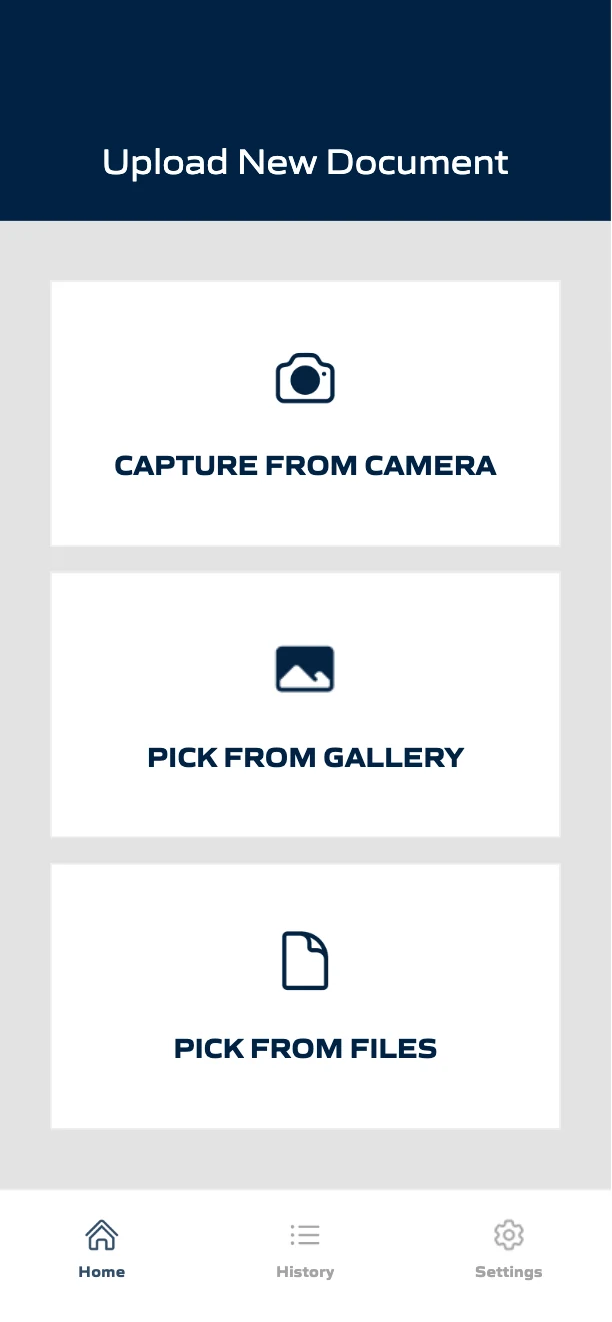
In the DataGun app, choose Capture From Camera to photograph a paper BOL or AWB, or Pick From Gallery or Pick From Files for one you already have. On a desktop, sign in at app.thedatagun.ai and upload from there.
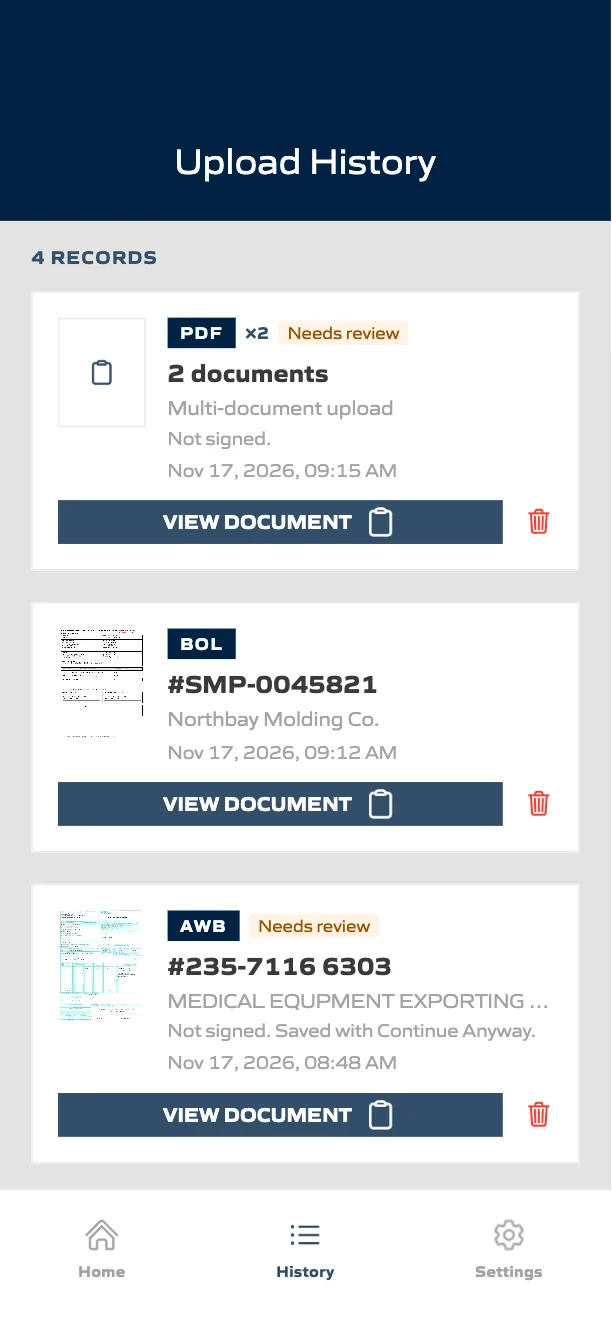
In the web app, the same three options are there: Capture from Camera uses the computer’s camera, or choose Pick from Gallery or Pick from Files. The web app accepts JPG, PNG or PDF files up to 10 MB. In a multi-page PDF, each bill of lading or air waybill becomes its own result, and they appear together as one entry in History.
For a clean capture:
- Lay the page flat.
- Use good, even light.
- Get the whole page in the frame, corners included.
Step 2: Let the app check the document
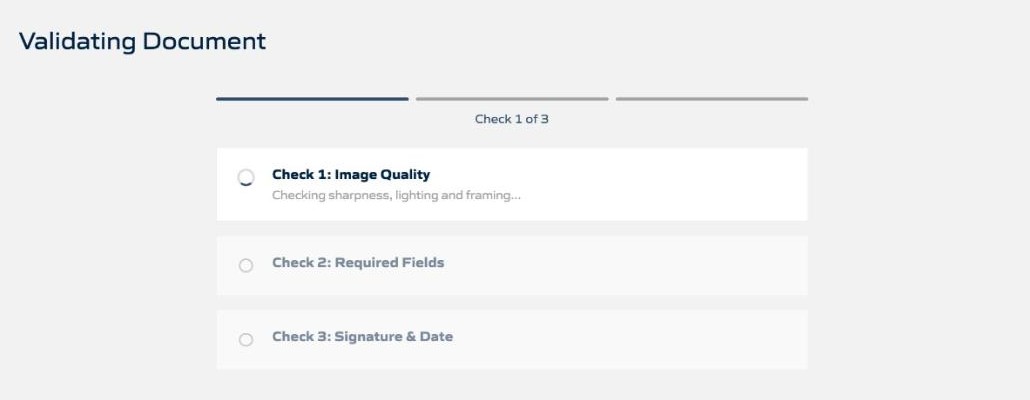
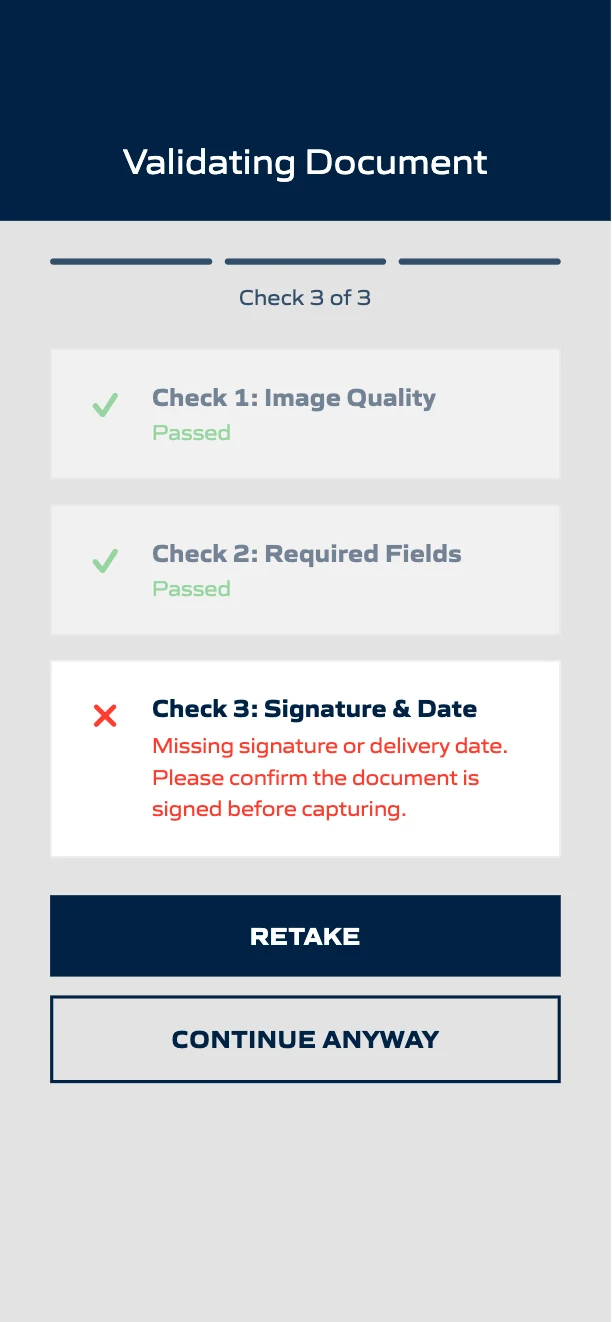
Before DataGun accepts a document, it runs three checks in order. Bills of lading and air waybills get all three; other documents get the image check.
- Check 1: Image quality. DataGun measures the image’s sharpness itself. A blurred photo fails, and DataGun extracts no values from it.
- Check 2: Required fields. Are the fields a BOL or AWB must carry filled in? An air waybill with no AWB number stops here.
- Check 3: Signature and date. Passes only when at least one signature box is actually signed. A printed date alone doesn’t count.
When a check fails, the driver sees why and can retake the document on the spot. For a photo or image file, if someone chooses Continue Anyway, DataGun first shows a Billing Risk Warning: the document failed one or more checks, and continuing may result in invoice errors, billing delays or rejected claims. They can choose Go Back to fix it, or I Understand, Continue to save it. DataGun marks a document saved this way Needs review, with a line under the marker that says what to look at (for example, “Not signed” or “BOL Number unclear”), on the results screen, in History and in the Export Data download.
A PDF can’t be retaken, so it goes straight to results. The same checks still run on every document in the PDF, and DataGun marks any document that fails Needs review with the reason. In the export it shows Validation Passed = no, and Validation Overridden stays no because there was no warning to override. If you’re sending data to a TMS, Validation Passed is the field to rely on.
Step 3: Review the fields the AI extracted
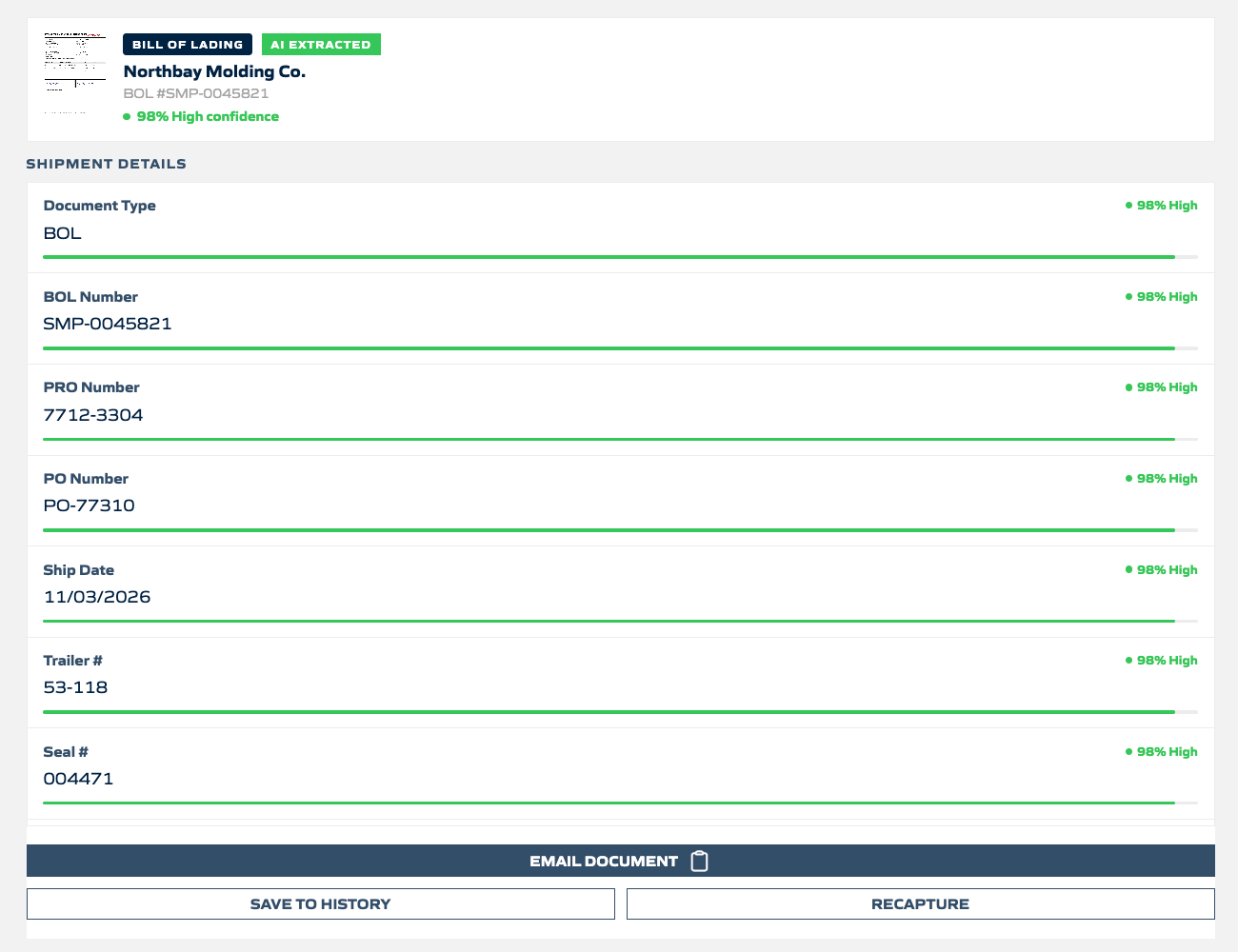
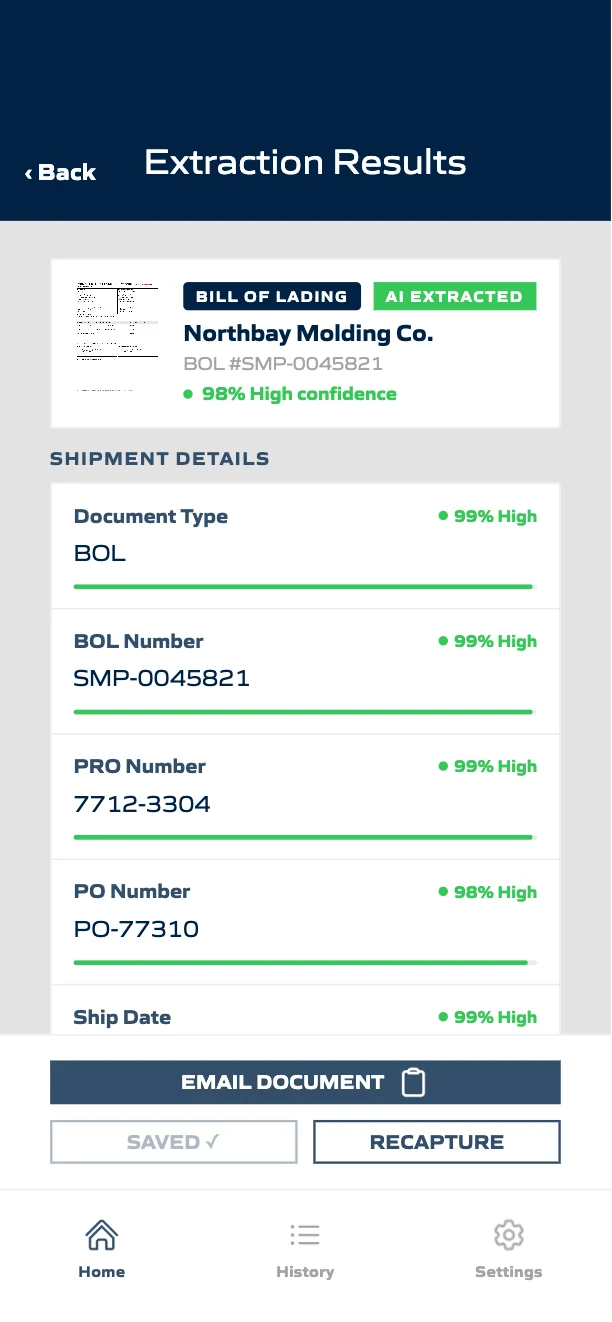
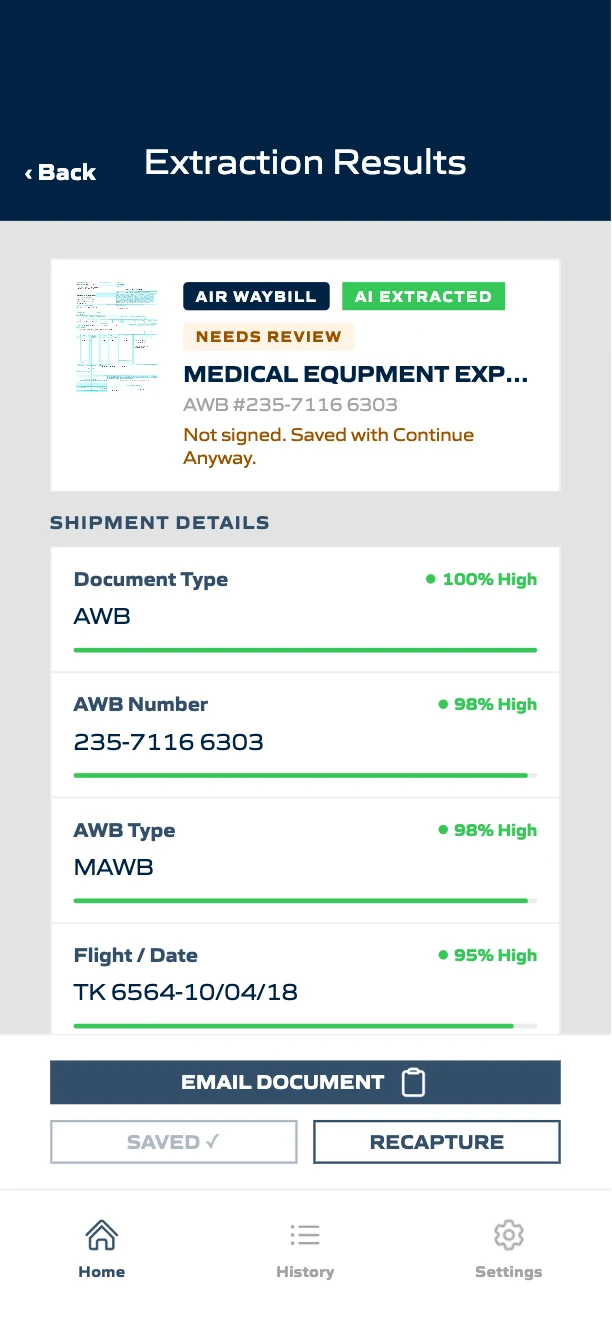
DataGun reads the document into labeled fields, grouped into shipment details, parties, products, volume and other references. The AI chooses from a fixed list of fields, and DataGun sets the names and units, so the same document returns the same field names and units every time. Pallets and cartons are always kept separate (“4 PLT”, “40 CTN”), and weights always carry LB or KG. Here is what it returned for the sample BOL and a sample AWB.
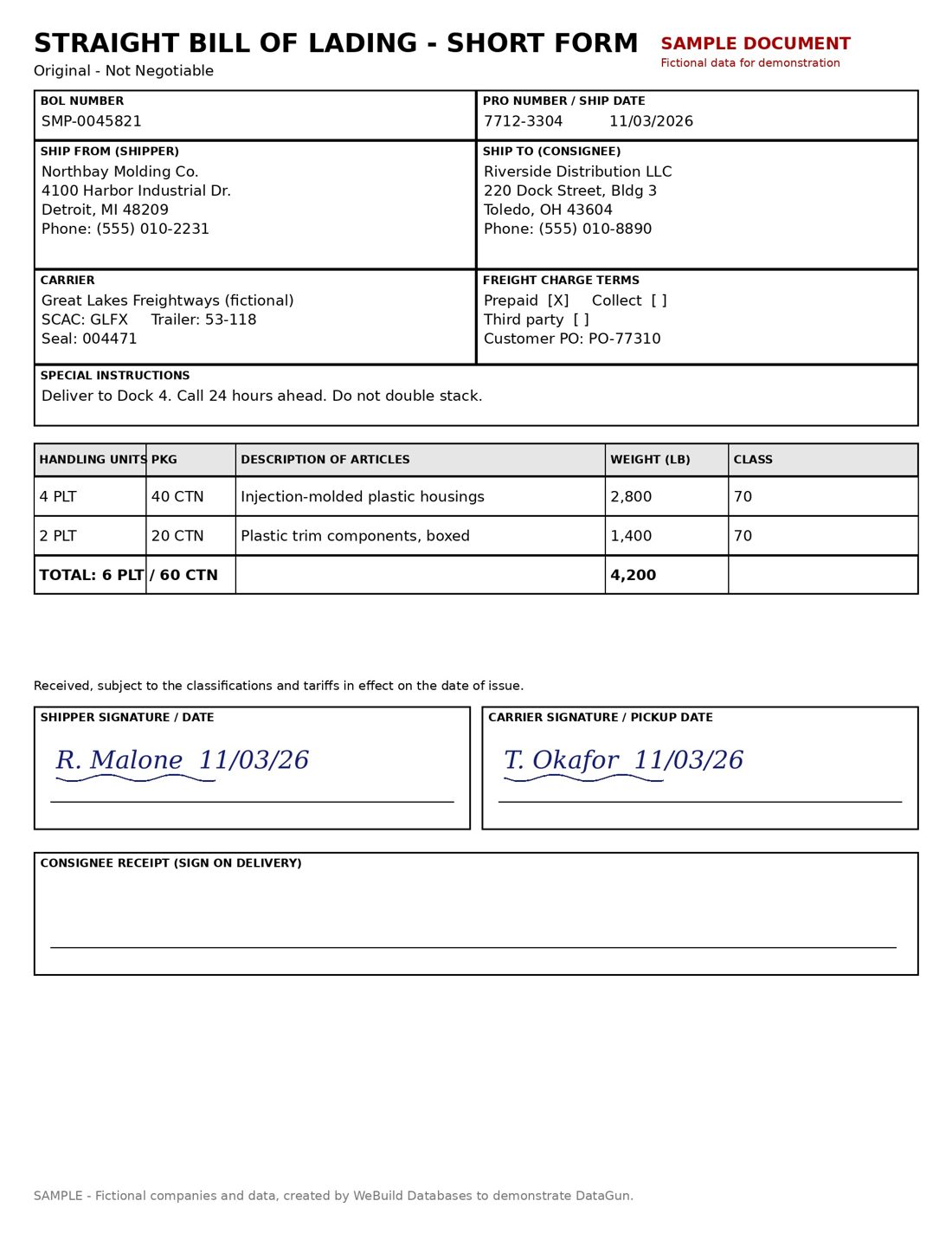
Sample bill of lading
| Bill of lading field | Sample value |
|---|---|
| BOL number | SMP-0045821 |
| Date | 11/03/2026 |
| Shipper | Northbay Molding Co., Detroit, MI |
| Consignee | Riverside Distribution LLC, Toledo, OH |
| Carrier, SCAC, trailer, seal | GLFX · 53-118 · 004471 |
| PRO number | 7712-3304 |
| Product 1 handling units · packages · weight · class | 4 PLT · 40 CTN · 2,800 LB · 70 |
| Product 2 handling units · packages · weight · class | 2 PLT · 20 CTN · 1,400 LB · 70 |
| Total packages · total weight | 60 CTN · 4,200 LB |
| Signatures and dates | Shipper and carrier signed, 11/03/26 |
| Terms, PO, instructions | Prepaid · PO-77310 · Dock 4 |
Sample air waybill
| Air waybill field | Sample value |
|---|---|
| AWB number | 235-7116 6303 |
| AWB type | MAWB |
| Shipper / consignee | Medical equipment exporter, Izmir → Vietnam Bank for Agriculture and Rural Development, Hanoi |
| Carrier, agent, IATA code | Turkish Airlines Inc. · Fast Star Lines Transport Ltd. · 88-4-7154-010 |
| Route and flight | Ataturk Airport, Turkey → Hanoi · TK 6564-10/04/18 |
| Pieces, weight | 5 pcs · 806.00 KG · chargeable 1,358.00 KG |
| Goods and dimensions | Medical equipment · 4/120×100×148, 1/120×100×87 |
| Rate class, rate, total | Q · 1.47 · 1,996.26 |
| Declared values, insurance | N.V.D · N.V.C. · XXX |
| Signature, payment | Not signed · Collect |
Step 4: Use the confidence score to decide what to review
Every field carries a percentage confidence score, and each document gets an overall score.
The app and the emailed report use the same cutoffs.
| Score | Range | What to do |
|---|---|---|
| High (green) | 90–100% | Read clearly. For key shipment values, DataGun has already double-checked (see below). |
| Medium (amber) | 70–89% | Take a quick look before relying on it. |
| Low (red) | Below 70% | Check every one against the document. |
When to check by hand:
- Documents marked Needs review: check every one. The line under the marker says what to look at, for example “BOL Number unclear” or “Not signed.”
- Low values: check every one.
- Medium values: take a quick look before relying on them.
- High values: DataGun read these clearly. For the key shipment values (document number, shipper, consignee, dates, PO, load and PRO numbers, trailer and quantities), DataGun reads the document a second time on its own. If the two reads disagree, DataGun lowers the value to Low so someone reviews it.
- Blurry photos: they fail the image check and DataGun keeps no values. Retake the photo.
Keep three ideas separate:
- Image quality: is the photo usable?
- Extraction confidence: how sure is the AI about each value?
- Business validation: is the document complete, signed and dated, with required fields filled?
Step 5: Save, email or send the data on
From the results screen, Save to History keeps the document and its data, and Email Document sends the extracted report. History lists every saved document by type, number, driver and capture time, with Export Data at the top. History lists air waybills by their AWB number. Any document saved past a failed check shows as Needs review, with what to look at, and the DataGun Standard CSV export carries the same flag in its Validation Passed and Validation Overridden columns. On an air waybill, the export’s BOL Number column holds the AWB number.
Want the data to go straight into your TMS, ERP or WMS? WeBuild Databases builds the connection by webhook, TMS-ready CSV export or a custom connector. A connection typically takes 3–5 business days, including testing, validation and user acceptance. See integrations.
Questions about how to scan bills of lading and AWBs
Capture and photo quality
How do I scan a bill of lading with my phone?
Open the DataGun app on iOS or Android, tap Capture From Camera and photograph the BOL flat, in good light, with the whole page and its corners in frame. DataGun checks the document, reads its fields and shows the results, ready to save, email or send to your TMS.
Can DataGun capture proof of delivery (POD) documents?
Yes. Signed delivery documents and PODs are captured and extracted, and labeled “Other.” The signature and required-field checks run on bills of lading and air waybills; other documents get the image-quality check.
Can the same app scan both bills of lading and air waybills?
Yes. DataGun reads BOLs and AWBs (air waybills, also written “airway bills”), and captures other freight documents such as invoices and PODs, labeling them “Other.” See air waybill scanning.
What happens if my photo is blurry, cropped or badly lit?
It fails Check 1 and you’re prompted to retake it. DataGun measures sharpness itself rather than relying on the AI’s judgment, and it extracts no values from an unreadable image. No values are kept from a blurry photo, so retake it.
Signatures, TMS and air waybills
How does DataGun catch a missing signature before the driver leaves?
Check 3 runs as soon as the BOL is scanned and passes only when at least one signature box is actually signed; a printed date isn’t enough. An unsigned BOL is stopped so the driver can get it signed and retake it before leaving. If it’s saved anyway, it’s marked Needs review: “Not signed.”
How do I get the extracted data into my TMS?
Email the report or export it from History today. WeBuild Databases builds the connection by webhook, TMS-ready CSV export or a custom connector. A connection typically takes 3–5 business days, including testing, validation and user acceptance.
What is the difference between a master and a house air waybill?
A master air waybill (MAWB) is issued by the airline for a whole consolidated shipment; a house air waybill (HAWB) is issued by the forwarder for each shipper’s part of it. DataGun shows the type in the AWB Type field (MAWB or HAWB) on every air waybill, and uses the AWB number as the document number.
Try DataGun Free
Ready to stop typing and start scanning?
Download DataGun from the App Store or Google Play, or sign in to the web app.